
Newland Warranty Check
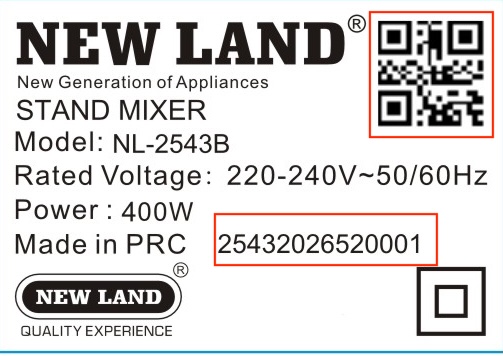
To check warranty status, enter the serial number printed on the label on the back or bottom of the product. If the label includes a QR code, scanning it usually returns the same serial number.
How to find the serial number
Where is the product serial number?
On the product rating label, there are usually two ways to access the serial number: the printed serial number and the QR code, which returns the same serial when scanned. In the sample below, both locations are marked in red.
- Find the rating label on the back, bottom or body of the product.
- Enter the serial number exactly, without extra spaces.
- If a QR code is available, scan it with your phone camera and enter the returned number.
Before submitting
- Have the serial number, product model or label photo ready.
- If you scanned the QR code, copy the displayed number.
- Write a short description of the issue or question.
- Enter a reachable phone number.
After submission, the Newland team will review your request and contact you for guidance.